Scale Tiny
 WorkspaceChrome extension
Superpowers for WhatsApp Web.
Manage contacts, automate replies and recover chats, right inside your conversations. Workspace adds a CRM, quick replies, scheduling, exports and privacy tools to every chat. Start with Free on your computer, without a Workspace account.
View in Chrome Web Store What it does
Works with
WhatsApp Web in Chrome
Free
Your CRM on this computer, without a Workspace account
Pro
$9 a month with the first month free, or $90 a year per person, in USD
Teams
Read shared records for free; editing needs Pro and permission
What it does
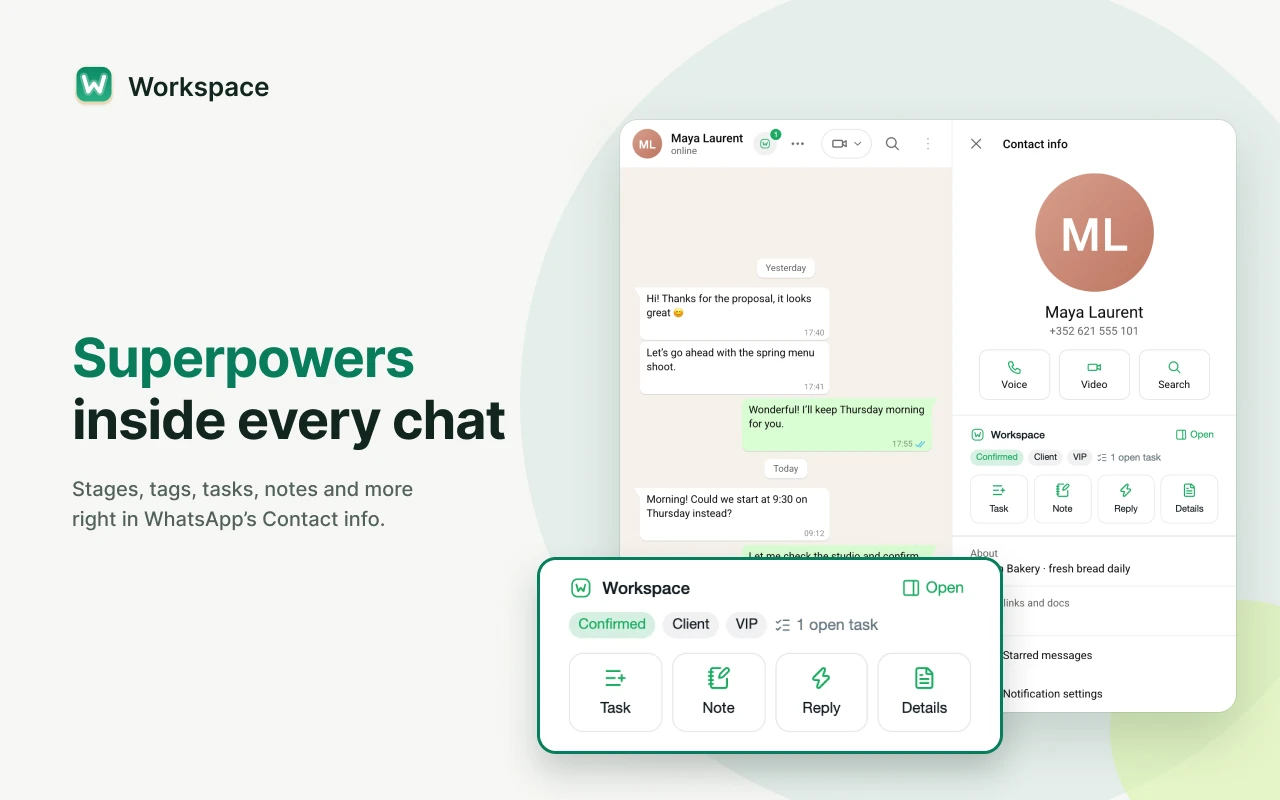
Superpowers inside every chat.
Stages, tags, tasks, notes and more, right in a chat’s Contact info. Add a chat to your CRM in one click, keep contacts, companies and custom fields beside the conversation, and track deals through pipelines. Tasks come with reminders, snooze and a Today view, so no follow-up slips.
Quick replies and messages that send later.
Saved replies pop up as you chat: type “/” or press Tab on a suggestion, with names and other variables filled in, and review every draft before it goes out. Schedule any message for the right moment, run broadcasts with recipient review, exclusions and working hours, and set up automations for keyword replies, greetings and away messages. Scheduled sending and automations need the linked WhatsApp Web tab open.
Export and save group members and contacts.
Export contacts and group members to CSV, Excel, vCard or number lists, made on your computer and never uploaded. Save group members who aren’t in your contacts yet, after a review. Import CSV, Excel or vCard with duplicate review and undo, and keep local backups with optional password encryption.
Blur chats and recover deleted messages.
Blur names, photos and messages when someone can see your screen. Keep copies of messages deleted for everyone, and of messages and chats you delete, while the viewer is on. Copies are kept only from the moment you turn it on.
Translate chats and draft replies with AI.
With Pro, translate whole conversations automatically and get on-device summaries, reply suggestions, rewrites and task drafts from your chats. You choose what to insert or save; AI never sends a message. Browser, hardware and language support vary; check compatibility in Plan and license before buying.
Sync your work across computers or with a team.
With Pro, optionally sync selected records across your computers or share them with a team. Synced records are stored in the cloud, where the service can read them. Cloud backups and record history cover only synced records. Members can read shared records for free; editing needs their Pro license and permission.
Plans
Start with a local CRM in Free, without a Workspace account. Pro removes saved-item limits and adds drafting help and optional sync for your own computers or a team.
Free
Keep your contacts and next steps beside your chats, without a Workspace account or application backend.
- Contact details, notes, tags and sales pipelines
- 10 quick replies and templates in total, 10 saved broadcasts and 10 automations
- 20 open tasks; completed tasks don’t count
- Import with review and undo, export and local backups
- Send later, save to WhatsApp contacts and group tools
- Blur chats and keep copies of deleted messages
- Limits count items kept at once; nothing is deleted to fit a plan
Pro · $9/month
Your first month is free, with all of Pro. Or $90 a year per person, in USD. One Pro license covers all your computers and lets you edit one workspace at a time.
- Everything in Free, with unlimited saved replies, broadcasts, automations and open tasks
- AI reply suggestions, summaries, task drafts, rewriting and chat translation, on supported computers
- Reuse saved import mappings for recurring files
- Optional sync for one person or a team
- Cloud backups and record history for synced records only
- Members bring their own license or use one assigned by its buyer
- Read shared records without Pro; editing also requires permission
Start Free. Add Pro when you need more.
Install Workspace from the Chrome Web Store and start with Free. Choose Pro if you need unlimited saved items, on-device drafting help or optional sync.
View in Chrome Web StoreIndependent software by Scale Tiny, not affiliated with WhatsApp or Meta. Contacts, notes and tasks use automatic device-key encryption, which does not protect a fully copied browser profile. On-device AI runs locally without API keys. Records you choose to sync are stored in the cloud and can be read by the service.